From this article you will learn how to disable automatic reservation confirmation emails for the "payment on the spot" option. With this solution, you will be able to treat incoming reservations as requests and confirm them manually to customers at a time of your choosing.
How does the manual confirmation of a reservation work?
By default, the Lockme system works in such a way that after a customer makes a reservation with the option of payment on the spot (at the premises), it automatically sends him a confirmation of this reservation to his email address.
However, we know that for some companies the specifics of operation are different - they treat such bookings from the widget as initial requests and only after verifying availability do they want to send the customer a confirmation. To make it easier for them, we have introduced a Manual Booking Confirmation option. Here's how to activate it for the selected room:
Step 1: Go to booking settings
Log in to the Company panel.
In the left menu, go to the Booking Settings tab.
In the list, find the selected room and click Edit.
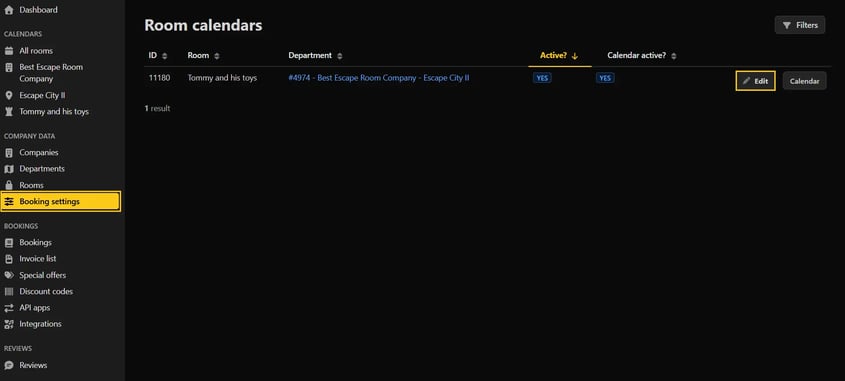

Step 2: Enable manual confirmation
In the tab that opens, find the Widget Settings section.
Locate the slider named Manual booking confirmation from the widget.
Click it to enable it (it will turn from gray to active).
From this point on, the system will not send an automatic confirmation email to a customer who makes a reservation in the widget by choosing to pay on the spot.

Note: This setting works independently for each room. If you want to activate manual confirmation for your entire listing, you need to enable this slider in the settings for each room individually.
Step 3: Save the changes
For the setup to take effect, make sure you save your changes. In the upper right corner of the screen, click the Save button.
Do you have questions about configuring the booking widget?
Write to: support@lock.me or call our hotline: +48 577 502 902.