In this article, you will learn how to set up additional questions for bookings and how they work when creating new bookings through the widget and partner panel.

    What are additional questions for booking?

    The additional questions for booking feature allows the room owner to add their own questions displayed during the booking process. This allows you to collect additional information needed from customers before their visit.

    Examples of uses

    Additional questions can be used for such things as:

    • selecting the difficulty level of the room,
    • choice of game variant,
    • selecting the level of frightfulness,
    • collecting additional organizational information from customers.

    Where to find the function?

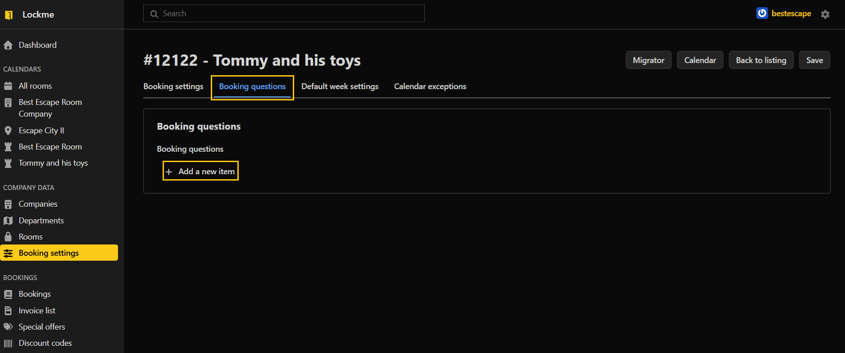
    To go to the configuration of additional questions:

    1. Log in to the company panel.
    2. Go to the "Booking Settings" tab.
    3. Select the room for which you want to configure questions.
    4. Go to edit.
    5. Open the "Booking questions" tab.

    Adding a new question

    To add a question:

    1. Click the "Add new item" button.
    2. Enter the content of the question.
    3. Set the display position of the question.
    4. Check the Required option if the customer must provide an answer before booking.
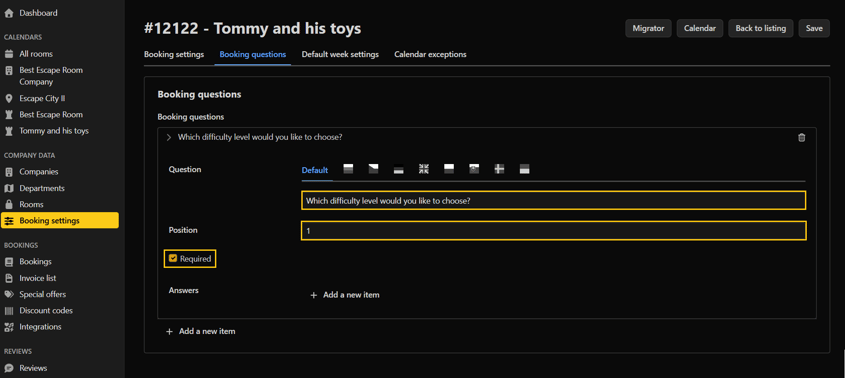
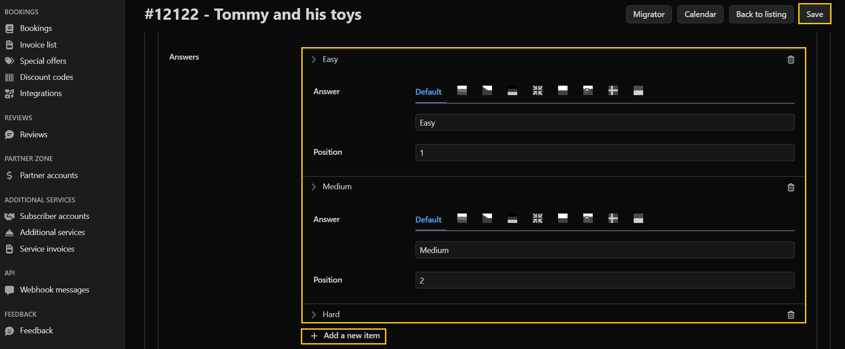
    5. Click the "Add new item" button to add possible answers.
    6. Set the position of the answer in the list.
    7. Save the changes

    How does the function work?

    The added questions will be visible:

    • during booking through the booking widget,
    • when manually creating a reservation in the calendar view,
    • during editing of existing reservations.

    The customer or employee making the reservation selects one of the available answers before saving the reservation.

    Need help?

    If you have additional questions about how to set up additional questions for your booking, please contact our team at [email protected] or by phone through our hotline: +48 577 502 902

    Ahoj, naše webové stránky používají soubory cookie, aby mohly správně fungovat všechny jejich funkce.

    Kromě těchto nezbytných souborů používáme také soubory cookie třetích stran, abychom mohli používat analytické, sociální a marketingové nástroje třetích stran. To znamená, že údaje shromážděné jejich prostřednictvím zpracovávají také poskytovatelé těchto nástrojů.

    Souhlasíte s používáním jiných souborů cookie než těch, které jsou nezbytné pro provoz stránek, jak je popsáno v našich zásadách ochrany osobních údajů?

    Nastavení souborů cookie

    Zde můžete změnit podrobné nastavení souborů cookie používaných na našich stránkách. Pokud souhlasíte s konkrétním typem souborů cookie, znamená to, že souhlasíte s tím, aby údaje jimi shromážděné byly použity správcem těchto stránek a poskytovatelem konkrétního nástroje, který používáme - jak je popsáno v našich zásadách ochrany osobních údajů.

    Tento typ souborů je nezbytný pro správné fungování našich stránek. Používají se mimo jiné pro funkce, jako je zapamatování si vybrané země uživatele, produktů v nákupním košíku nebo barevného motivu webu.

    Tyto soubory nám umožňují pochopit, jak uživatelé procházejí našimi stránkami. Jedním z takových nástrojů je Google Analytics, který nám umožňuje shromažďovat anonymní informace o počtu návštěv, používání konkrétních funkcí nebo typu uživatelských zařízení. Díky nim jsme schopni přizpůsobit stránky potřebám a možnostem různorodých uživatelů.

    Nástroje společností Google, TikTok, Facebook a Seznam.cz, které shromažďují informace o uživatelích, které můžeme využít pro marketingové účely.