In this article, you will learn how to set up additional questions for bookings and how they work when creating new bookings through the widget and partner panel.

    What are additional questions for booking?

    The additional questions for booking feature allows the room owner to add their own questions displayed during the booking process. This allows you to collect additional information needed from customers before their visit.

    Examples of uses

    Additional questions can be used for such things as:

    • selecting the difficulty level of the room,
    • choice of game variant,
    • selecting the level of frightfulness,
    • collecting additional organizational information from customers.

    Where to find the function?

    To go to the configuration of additional questions:

    1. Log in to the company panel.
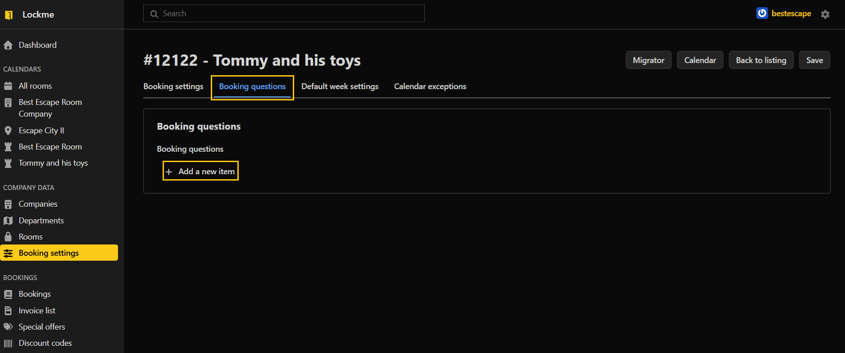
    2. Go to the "Booking Settings" tab.
    3. Select the room for which you want to configure questions.
    4. Go to edit.
    5. Open the "Booking questions" tab.

    Adding a new question

    To add a question:

    1. Click the "Add new item" button.
    2. Enter the content of the question.
    3. Set the display position of the question.
    4. Check the Required option if the customer must provide an answer before booking.
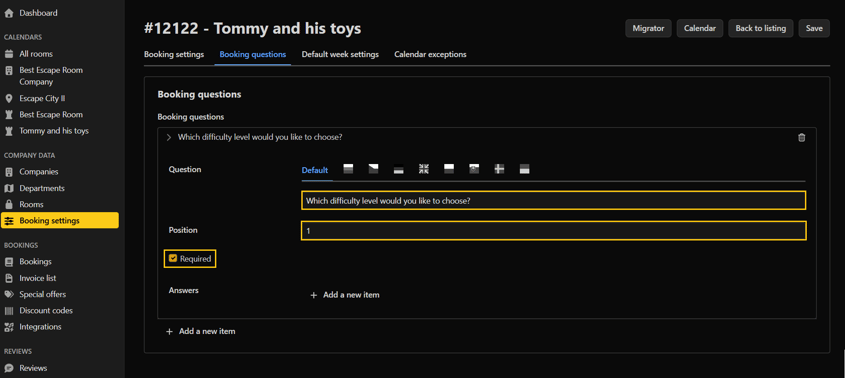
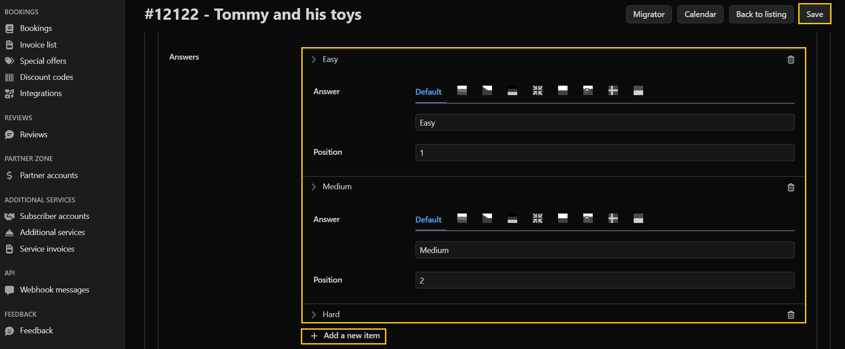
    5. Click the "Add new item" button to add possible answers.
    6. Set the position of the answer in the list.
    7. Save the changes

    How does the function work?

    The added questions will be visible:

    • during booking through the booking widget,
    • when manually creating a reservation in the calendar view,
    • during editing of existing reservations.

    The customer or employee making the reservation selects one of the available answers before saving the reservation.

    Need help?

    If you have additional questions about how to set up additional questions for your booking, please contact our team at [email protected] or by phone through our hotline: +48 577 502 902

    Привіт, наш веб-сайт використовує файли cookie, щоб усі його функції працювали належним чином.

    На додаток до необхідних, ми також використовуємо сторонні файли cookie, щоб ми могли використовувати сторонні аналітичні, соціальні медіа або маркетингові інструменти. Це означає, що дані, зібрані за їх допомогою, також обробляються постачальниками цих інструментів.

    Чи даєте ви згоду на використання файлів cookie, крім тих, які необхідні для роботи сайту, як описано в нашій політиці конфіденційності?

    Налаштування файлів cookie

    Тут ви можете змінити детальні налаштування файлів cookie, які використовуються на нашому сайті. Якщо ви погоджуєтеся на певний тип файлів cookie, це означає, що ви погоджуєтеся з тим, що дані, зібрані ними, будуть використовуватися адміністратором цього сайту, а також постачальником конкретного інструменту, який ми використовуємо - як описано в нашій політиці конфіденційності.

    Цей тип файлів необхідний для належного функціонування нашого сайту. Вони використовуються, зокрема, для таких функцій, як запам'ятовування браузером обраної користувачем країни, товарів у кошику або колірної теми сайту.

    Ці файли дозволяють нам зрозуміти, як користувачі пересуваються нашим сайтом. Одним з таких інструментів є Google Analytics, який дозволяє нам збирати анонімну інформацію про кількість відвідувань, використання певних функцій або тип користувацьких пристроїв. Завдяки їм ми можемо адаптувати сайт до потреб і можливостей різних користувачів.

    Інструменти Google, TikTok, Facebook і Seznam.cz, які збирають інформацію про користувачів, яку ми можемо використовувати в маркетингових цілях.