In this article, you will learn how to set up additional questions for bookings and how they work when creating new bookings through the widget and partner panel.

    What are additional questions for booking?

    The additional questions for booking feature allows the room owner to add their own questions displayed during the booking process. This allows you to collect additional information needed from customers before their visit.

    Examples of uses

    Additional questions can be used for such things as:

    • selecting the difficulty level of the room,
    • choice of game variant,
    • selecting the level of frightfulness,
    • collecting additional organizational information from customers.

    Where to find the function?

    To go to the configuration of additional questions:

    1. Log in to the company panel.
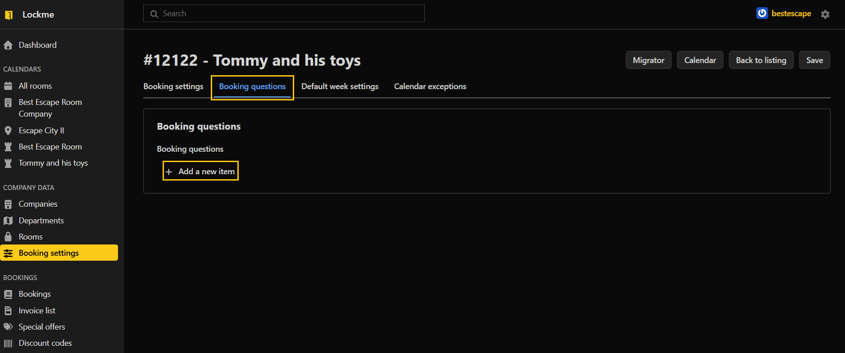
    2. Go to the "Booking Settings" tab.
    3. Select the room for which you want to configure questions.
    4. Go to edit.
    5. Open the "Booking questions" tab.

    Adding a new question

    To add a question:

    1. Click the "Add new item" button.
    2. Enter the content of the question.
    3. Set the display position of the question.
    4. Check the Required option if the customer must provide an answer before booking.
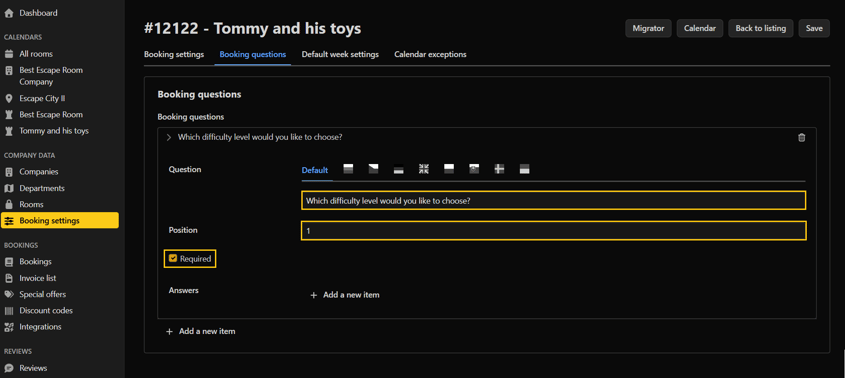
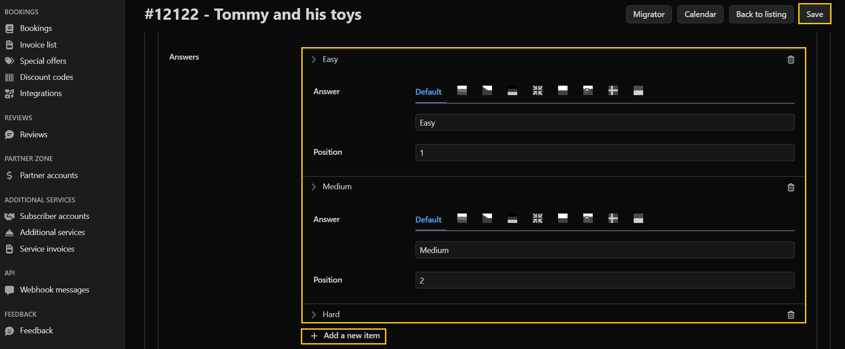
    5. Click the "Add new item" button to add possible answers.
    6. Set the position of the answer in the list.
    7. Save the changes

    How does the function work?

    The added questions will be visible:

    • during booking through the booking widget,
    • when manually creating a reservation in the calendar view,
    • during editing of existing reservations.

    The customer or employee making the reservation selects one of the available answers before saving the reservation.

    Need help?

    If you have additional questions about how to set up additional questions for your booking, please contact our team at [email protected] or by phone through our hotline: +48 577 502 902

    Ahoj, naša webová stránka používa súbory cookie, aby mohli všetky jej funkcie správne fungovať.

    Okrem týchto nevyhnutných súborov používame aj súbory cookie tretích strán, aby sme mohli používať analytické, sociálne a marketingové nástroje tretích strán. To znamená, že údaje získané prostredníctvom nich spracúvajú aj poskytovatelia týchto nástrojov.

    Súhlasíte s používaním iných súborov cookie ako tých, ktoré sú potrebné na prevádzku stránky, ako je uvedené v našich zásadách ochrany osobných údajov?

    Nastavenia súborov cookie

    Tu môžete zmeniť podrobné nastavenia súborov cookie používaných na našej stránke. Ak súhlasíte s konkrétnym typom súborov cookie, znamená to, že súhlasíte s tým, aby údaje, ktoré zhromažďujú, používal správca tejto stránky, ako aj poskytovateľ konkrétneho nástroja, ktorý používame - ako je opísané v našich zásadách ochrany osobných údajov.

    Tento typ súborov je potrebný na správne fungovanie našej stránky. Používajú sa okrem iného na funkcie, ako je zapamätanie si vybranej krajiny používateľa, produktov v nákupnom košíku alebo farebného motívu stránky.

    Tieto súbory nám umožňujú pochopiť, ako sa používatelia pohybujú po našej stránke. Jedným z takýchto nástrojov je Google Analytics, ktorý nám umožňuje zhromažďovať anonymné informácie o počte návštev, používaní konkrétnych funkcií alebo type používateľských zariadení. Vďaka nim dokážeme prispôsobiť stránku potrebám a možnostiam rôznych používateľov.

    Nástroje spoločností Google, TikTok, Facebook a Seznam.cz, ktoré zhromažďujú informácie o používateľoch, ktoré môžeme použiť na marketingové účely.

    Tento jazyk je v súčasnosti experimentálny. Časti webovej stránky môžu byť nesprávne preložené.