From this article, you'll learn how to override the default 24 hours to pay for a reservation manually entered into the calendar, and how to set a custom time limit for customer deposits.
When you add a reservation manually from the calendar in the Lockme panel, you can require the customer to pay for it online. By default, the system gives the customer 24 hours to complete the payment after receiving an email with a link. But what if the reservation is for tomorrow and you need the payment sooner? Or, conversely, the reservation is a month away and you want to give the customer more time?
Now you can easily override this time and set a custom payment deadline for the reservation.
Here’s how to do it step by step:
Important: The feature to set a custom payment deadline is available only to businesses that process online payments within the Lockme booking widget.
Step 1: Create a new reservation
Log in to the Cockpit dashboard
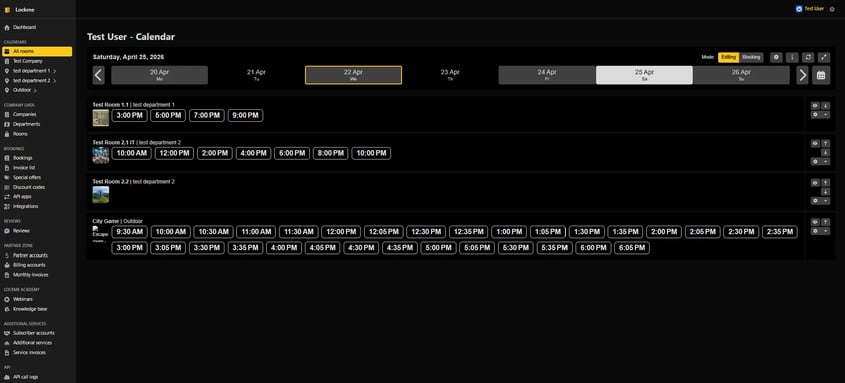
Go to the Calendars tab -> All Rooms
Make sure you are in Edit mode and click on an empty date slot to open the window for adding a new reservation

Step 2: Configure payment and payment deadline
In the booking window, look at the first section at the very top, titled “Pricing Details”
Select the price list you want to use for this booking
Select the number of people
Check the “Require full payment” checkbox
When you select it, a new text field will appear just below: Custom payment time (hours)
Enter the desired number of hours in this field that the customer will have to complete the transfer (e.g., enter “2” if you want the link to expire after two hours).
Important: If you leave this field blank, the system will use the default setting and give the customer the standard 24 hours.

Step 3: Sending the link to the customer
In order for the customer to pay for the reservation, they must receive a message from the system containing a unique link.
Go to the Customer Details section
Be sure to enter the correct address in the Email field
Make sure the Send email notification to the customer checkbox is selected
Fill out the rest of the form (first name, last name, phone number) and click the green Save button in the bottom right corner
Done! The system will send the player an email with a summary and a payment link. If the payment is not received within the custom timeframe you specified, the reservation will be automatically canceled, and the date will return to the calendar as available.
Do you have questions about managing reservations from the dashboard?
Feel free to email us at: support@lock.me or call our hotline: +48 577 502 902.